Build and serve sundaes on the go with this brand-new version of Papa's Freezeria, with gameplay and controls reimagined for Android phones!
You've just started a relaxing summer job at an oceanfront ice cream shop, but things get hectic when all of Papa Louie's customers arrive on the island! You'll need to whip up delicious Freezer sundaes by pouring ice cream, adding mixables and syrups, blending sundaes, adding whipped cream and toppings, and don't forget the cherry on top for a perfect summertime treat!
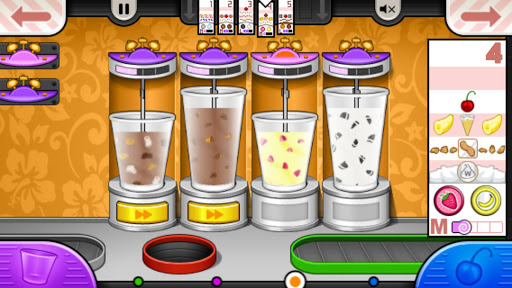
You'll need to multitask between each area of the restaurant, with new controls designed to work just right in the palm of your hand. Head to the Order Station to watch for customers waiting in the lobby. Switch to the Build Station to combine ice cream and mixables for each sundae. Jump to the Mix Station to mix sundaes until they're blended just right. Hop to the Top Station to pour whipped cream and toppings before serving the sundae to your picky customers. Each Station is a hands-on experience, where you'll need to drag, swipe, and tap your way through the sundae-building process.
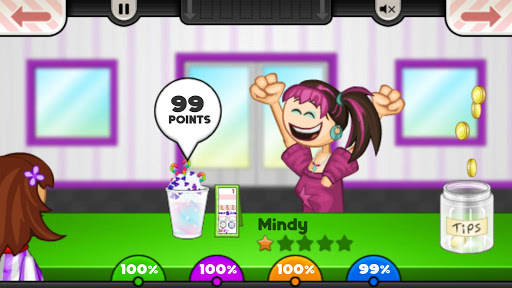
Keep your customers happy to earn points and level up. As your level rises, you'll unlock new toppings for the shop, and new customers will start to visit the Freezeria! A well-crafted sundae also earns you tips, which you can spend on upgrades and decorations for the lobby!
NEW FOR PAPA'S FREEZERIA TO GO
Papa's Freezeria To Go is redesigned and reimagined for smaller screens, so your fingers won't get in the way of the action!
CONTROL WITH YOUR THUMBS - You'll switch stations using buttons in the corners of the screen, perfect for your thumbs. You can also use buttons in the top corners to quickly switch Order Tickets, and you can view all of your Order Tickets in a zoomed-in mode for easy reading.
BUILD STATION - We've completely redesigned the Build Station for smaller screens, so you can quickly and easily pour ice cream and mixables like a master! The Pour Button and Bonus Meter are moved to the side and sized just right for your thumb, so you can watch the meter and tap at the right time without any fingers blocking your view. When it's time to choose a mixable or a syrup, the entire screen is filled with large buttons so you can easily tap the correct item.
MIX STATION - We've fine-tuned the Mix Station upgrades to work even better on small touch screens. Once you purchase the Blend Alarm upgrades, you can drag these large alarms and snap them onto any blender. Booster Buttons are also large and easy to press, and you can even use multi-touch to boost multiple blenders at once!
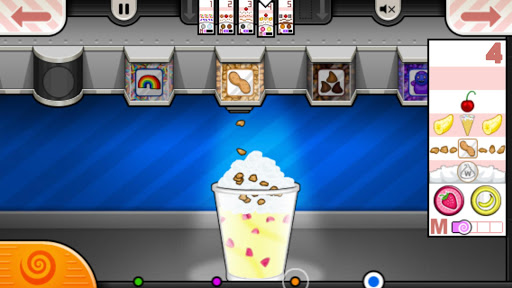
TOP STATION - We've brought back the Topping Bin carousel from "Papa's Burgeria To Go!", which lets you top sundaes in a brand-new way! Swipe the carousel of Topping Bins to choose the item you want to use, then grab the sundae cup to start pouring toppings evenly across the sundae. You can also tap a button to switch to placeable items like cherries and cookies. And with full multi-touch support, you can keep one finger sliding the bins and another tapping on the cup below, so you'll have those sundaes finished in no time!
NEW INGREDIENTS - We've added a ton of new ingredients that can't be found in the classic or HD versions of the game, including mixables, syrups, whipped cream flavors, and other toppings that you'll unlock as you play the game. There's over 70 unique ingredients for you to discover!
GAME FEATURES
- Hands-on ice cream shop in the Papa Louie universe
- All new controls and gameplay designed for smaller screens
- Multi-task between building, mixing, and topping
- Shop to buy upgrades using your in-game tips
- 85 customers to unlock with unique orders
- Challenging Closers and Food Critic
- 120 in-game achievements to earn
NOTE FOR TABLET USERS
Papa's Freezeria To Go is designed especially for smaller screens. If you're looking for large-screen gameplay, check out "Papa's Freezeria HD" for tablets!
If you’re an Android user and don’t download the app from the official Google Play Store, you may find the installation process more complicated than usual.
But we are delighted to inform you that you don’t need to worry. To ensure you could install this app smoothly, we have written and uploaded a detailed tutorial. It would guide you on installing an app after downloading it from our website step by step, with the help of pictures.
You may find this helpful article on the downloading site, or visit How to install APK/XAPK files on Android.
If you need further help, please do not hesitate to contact us via email [email protected].
We fully understand your concern about safety. We agree that one person wouldn’t be too careful in the cyber world. Meanwhile, we are happy to tell you that one of our priorities is to provide our users with safe app files that they can use without any worries.
We guarantee that all the app files we provided originate from official and reliable sources. We promise that they do not contain any malware that will harm your hardware or the safety of your privacy.
We are glad to let you know that the vast majority of apps on our website are available for free download. Only a small selection of apps require payment, and their prices are set solely by the respective developers—we simply provide an official and secure download platform.
Rest assured, whether an app is free or paid, every download link on our site is verified and completely safe. You can download with confidence, and no account registration is needed—just click the download button and you're all set!
Recently we received a lot of emails from our users, which said they couldn't log in for different reasons, such as "forgot the user name or password" or "had a new phone." We are willing to help you out. Please read the notes below to see what we can do.
To answer this question, please first let us know which account you’re referring to.
If you're referring to your account of some app, like your Facebook account or your Youtube account. Unfortunately, we would not be able to help in this case. We would suggest you turn to the customer service of this application.
If you’re referring to your Appurse account, we should apologize for your confusion since there is no Appurse account. We never require registration for our service, and you will not find any procedure related to creating an account or registering on our website.
This question is essentially quite similar to the prior one. It’s a pity that we are unable to help you to cancel the subscription to a third-party application directly, while we would suggest you to contact its customer service for further information.
Sorry that we are unable to help you to get a refund from a third-party application directly. If you wish to get a refund from a third-party app, we would suggest you to contact its customer service. We would be happy to provide you the way to contact them.
If you want a refund from us, we should apologize for your confusion. Our service is 100% free, and any payment information is not required.
If you run into any site that asks you to provide your payment information, be careful. Remember never reveal your payment information to any unauthorized third parties, no matter how attempting their offer may seem.
Sorry that we cannot answer this question directly, for this only aims to answer some general questions. You may find how to use a certain app by checking our review page.