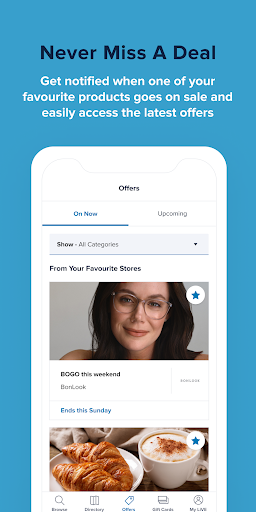
LiVE by CF lets you put the mall in the palm of your hand (literally!). From building a shopping list with products and offers from your favourite retailers to tracking your gift card balance and planning your route ahead of time, you can do it all from your own device. Here's how you can use LiVE by CF to get the most out of your next shopping trip at any Cadillac Fairview (CF) mall:
Manage your CF gift cards in one place
You’ve received a CF SHOP! Mastercard® Gift Card? What a treat! Claim your e-gift card easily with LiVE by CF and follow the prompts to add your card to your Google Pay wallet so you can start spending in-store using tap to pay! Add your physical CF SHOP! card gift cards to your app, too, so you always keep your card balances at your fingertips.
Looking for the perfect gift? Give the gift of choice! Send a CF SHOP! Mastercard Gift Card instantly by email to your friends, family and colleagues or mail them a CF SHOP! card they can carry in their wallet.
Find exactly what you're looking for
Search the mall like you'd search online. Discover what's in-store, what's new and what's on sale! Have a craving while shopping or looking for something specific? Find everything from coffee shops to sweaters to boots in one search. Need some inspiration? We are here to help! LiVE by CF will learn from your interactions within our App to improve the relevancy of the results we show you and provide recommendations we think you will like. You can pause or turn off personalization in your Settings.
Never miss an offer
Access all the latest offers from your favourite retailers in one tap. Want to be the first to know? Join My LiVE and get notified anytime your preferred stores and restaurants have a new offer. Make sure to add them to your favourites!
Personalize your shopping list
Create a My LiVE account and keep your shopping list at your fingertips. Personalize your shopping list by saving your top products and offers so you can hit the ground running at your next visit.
Navigate your way
Save time and plan ahead by using our navigation feature. We'll suggest the best route to make sure you get to every stop on your list in the most efficient way, whether it is to get there quickly or take the least busy option.
By downloading or installing LiVE by CF, you consent to the installation of LiVE by CF and to future updates and upgrades, including automatic updates and upgrades.
These updates and upgrades may occur for various reasons including adding or removing functionality, fixing bugs, and addressing issues relating to security or performance. You can withdraw your consent at any time by uninstalling LiVE by CF. To request assistance with the removal or disabling of LiVE by CF, please contact Cadillac Fairview at The Cadillac Fairview Corporation Limited, 20 Queen Street West, 5th Floor, Toronto, ON M5H 3R4, or email [email protected]. LiVE by CF (including any updates or upgrades) may (i) cause your device to automatically communicate with Cadillac Fairview or its third-party service provider’s servers to deliver the functionality described in the LiVE by CF Terms of Use and LiVE by CF Privacy Notice and to record usage metrics, (ii) affect app-related preferences or data stored in your device, and (iii) collect personal information and other information as described in the LiVE by CF Privacy Notice. Please review the LiVE by CF Privacy Notice for more information on device permissions.
If you’re an Android user and don’t download the app from the official Google Play Store, you may find the installation process more complicated than usual.
But we are delighted to inform you that you don’t need to worry. To ensure you could install this app smoothly, we have written and uploaded a detailed tutorial. It would guide you on installing an app after downloading it from our website step by step, with the help of pictures.
You may find this helpful article on the downloading site, or visit How to install APK/XAPK files on Android.
If you need further help, please do not hesitate to contact us via email [email protected].
We fully understand your concern about safety. We agree that one person wouldn’t be too careful in the cyber world. Meanwhile, we are happy to tell you that one of our priorities is to provide our users with safe app files that they can use without any worries.
We guarantee that all the app files we provided originate from official and reliable sources. We promise that they do not contain any malware that will harm your hardware or the safety of your privacy.
We are glad to let you know that the vast majority of apps on our website are available for free download. Only a small selection of apps require payment, and their prices are set solely by the respective developers—we simply provide an official and secure download platform.
Rest assured, whether an app is free or paid, every download link on our site is verified and completely safe. You can download with confidence, and no account registration is needed—just click the download button and you're all set!
Recently we received a lot of emails from our users, which said they couldn't log in for different reasons, such as "forgot the user name or password" or "had a new phone." We are willing to help you out. Please read the notes below to see what we can do.
To answer this question, please first let us know which account you’re referring to.
If you're referring to your account of some app, like your Facebook account or your Youtube account. Unfortunately, we would not be able to help in this case. We would suggest you turn to the customer service of this application.
If you’re referring to your Appurse account, we should apologize for your confusion since there is no Appurse account. We never require registration for our service, and you will not find any procedure related to creating an account or registering on our website.
This question is essentially quite similar to the prior one. It’s a pity that we are unable to help you to cancel the subscription to a third-party application directly, while we would suggest you to contact its customer service for further information.
Sorry that we are unable to help you to get a refund from a third-party application directly. If you wish to get a refund from a third-party app, we would suggest you to contact its customer service. We would be happy to provide you the way to contact them.
If you want a refund from us, we should apologize for your confusion. Our service is 100% free, and any payment information is not required.
If you run into any site that asks you to provide your payment information, be careful. Remember never reveal your payment information to any unauthorized third parties, no matter how attempting their offer may seem.
Sorry that we cannot answer this question directly, for this only aims to answer some general questions. You may find how to use a certain app by checking our review page.