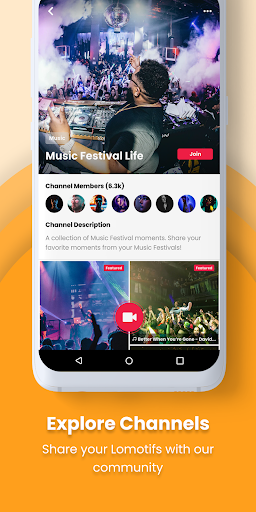
Make mini music videos for Instagram, Facebook, Twitter and Musical.ly. * It’s the best app to 1. Add music to your video clips 2. Join your video clips (or photos) into a music video collage in seconds.
Lomotif has millions of users worldwide and it’s NEW on Android!
+ Add music
+ Join your video clips (photos) into a collage/montage
+ Save montages to camera roll in HD
+ Share easily to Instagram, Twitter, Text Message, Emai
+ A must-have tool for all your selfie, Musical.ly, Dubsmash, Hyperlapse videos!
+ INSTANT EDITS
Forget video editors and the hassle of editing!
Automatically transforms clips in your camera roll into awesome music videos, no editing required.
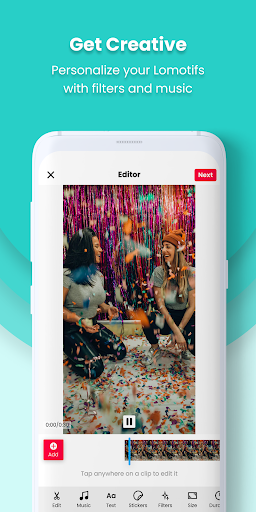
+ TRIM, EDIT VIDEOS EASILY
You can tweak your movie to perfection with our built-in editor.
Intuitive gestures will allow you to select your best moments to be featured as video highlights.
Easily rearrange clips to tell your story.
Easily import videos and photos from Instagram, Facebook.
+ SQUARE CROP OR LANDSCAPE
Switch easily between 2 formats:
- Square
- Landscape
+ ADD TITLES AND EMOJI (New!)
Add title and text overlays to your video that fade away
+ ADD FILTERS (New!)
7 awesome filters to color your videos
+ ADDITIONAL POWER FEATURES
Get your music video formatted for Instagram with just one click
Use Hyperlapse videos for an interesting timelapse/fast-mo effect
Use photos to create a slideshow
+ SHARE IT ANYWHERE YOU WANT
Messenger
Text Message
+OR KEEP IT PRIVATE
Your final video will also be saved to your device, so you can choose to keep it private!
HERE’S HOW TO CREATE BEAUTIFUL MUSIC VIDEOS IN SECONDS:
Select video clips from your camera roll
Find and add music
Instantly preview your short movie
Share on social media sites or save it to your camera roll
It's the indispensable tool for social media sharing!
— FAQs —
How do I change the sequence of the clips?
To reorder the sequence of your clips, simply tap and hold the clip's thumbnail— that's the little circle image— then drag and drop it anywhere you wish on the timeline.
Tap & hold the circular thumbnail of the video clip. Rearrange the order of your clips by dragging & dropping them wherever you want on the timeline.
How do I delete a clip?
Delete any clip by tapping & holding it. Carry it to the '—' symbol that appears.
What is the maximum number of clips I can use in a music video?
Lomotif's new update lets you include an unlimited number of clips! Trust us, we've tried over a thousand clips & created the coolest videos.
Can I add/change filters?
This is a new feature for Android! There's 7 filters to choose from.
Can I add a title to my video?
Type it in on the 'Enter a Title' section on your Create screen. You can tweak the font and colour however you want to!
-- An Important note to our Android users --
We will be adding new features all the time!
Enable push notifications to receive our latest updates. ;)
We've recently added the following features:
- Add titles
- Add filters
- Adjustable time: make a Lomotif from anywhere between 3 secs to 30 secs!
-- Issues with the app --
Please write in to us by using the "Send Feedback" form in the app and describe your problem. We typically reply within 1-2 working days!
-- Get Inspired --
Love the app? Join our community: www.lomotif.com | facebook.com/lomotif | instagram.com/lomotif
*
PLEASE READ BEFORE DOWNLOADING: Certain Android devices may not be fully compatible with this version of the app. Please report problems using the "Send Feedback" button in the app's Menu. We're continuously working hard to make Lomotif perform better on ALL devices.
Important: Some devices may not support the previewing multiple clips in quick succession. If your video doesn't play smoothly, export it and preview it in your gallery.
If you’re an Android user and don’t download the app from the official Google Play Store, you may find the installation process more complicated than usual.
But we are delighted to inform you that you don’t need to worry. To ensure you could install this app smoothly, we have written and uploaded a detailed tutorial. It would guide you on installing an app after downloading it from our website step by step, with the help of pictures.
You may find this helpful article on the downloading site, or visit How to install APK/XAPK files on Android.
If you need further help, please do not hesitate to contact us via email [email protected].
We fully understand your concern about safety. We agree that one person wouldn’t be too careful in the cyber world. Meanwhile, we are happy to tell you that one of our priorities is to provide our users with safe app files that they can use without any worries.
We guarantee that all the app files we provided originate from official and reliable sources. We promise that they do not contain any malware that will harm your hardware or the safety of your privacy.
We are glad to let you know that the vast majority of apps on our website are available for free download. Only a small selection of apps require payment, and their prices are set solely by the respective developers—we simply provide an official and secure download platform.
Rest assured, whether an app is free or paid, every download link on our site is verified and completely safe. You can download with confidence, and no account registration is needed—just click the download button and you're all set!
Recently we received a lot of emails from our users, which said they couldn't log in for different reasons, such as "forgot the user name or password" or "had a new phone." We are willing to help you out. Please read the notes below to see what we can do.
To answer this question, please first let us know which account you’re referring to.
If you're referring to your account of some app, like your Facebook account or your Youtube account. Unfortunately, we would not be able to help in this case. We would suggest you turn to the customer service of this application.
If you’re referring to your Appurse account, we should apologize for your confusion since there is no Appurse account. We never require registration for our service, and you will not find any procedure related to creating an account or registering on our website.
This question is essentially quite similar to the prior one. It’s a pity that we are unable to help you to cancel the subscription to a third-party application directly, while we would suggest you to contact its customer service for further information.
Sorry that we are unable to help you to get a refund from a third-party application directly. If you wish to get a refund from a third-party app, we would suggest you to contact its customer service. We would be happy to provide you the way to contact them.
If you want a refund from us, we should apologize for your confusion. Our service is 100% free, and any payment information is not required.
If you run into any site that asks you to provide your payment information, be careful. Remember never reveal your payment information to any unauthorized third parties, no matter how attempting their offer may seem.
Sorry that we cannot answer this question directly, for this only aims to answer some general questions. You may find how to use a certain app by checking our review page.